Product page: https://www.repairloader.com/manual.php/bdce48b
If you’re browsing Komatsu D31-17 manual listings, the easiest way to buy with confidence is to match the identifiers shown on the listing to the identifiers on your machine. This post is a coverage-preview aid: it helps you recognize what a D31-17 shop manual listing is (and what it isn’t), and which cues typically confirm the right document for your exact variant.
The listing cues to match first
With Komatsu D31 variants, model names can look close—so start by confirming the full model line (including suffix letters), then the serial coverage.
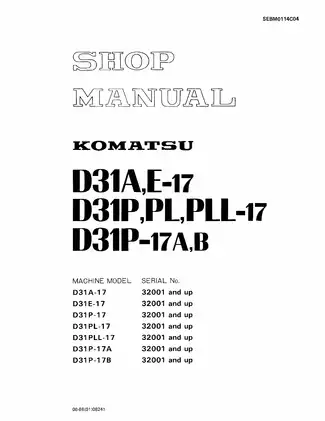
A D31-17 shop manual cover may list multiple model lines, such as:
- D31A-17 / D31E-17
- D31P-17 / D31PL-17 / D31PLL-17
- D31P-17A / D31P-17B
You’ll often see a serial statement like “32001 and up” tied to those model lines. When the listing shows the same model line(s) and the same serial window you have on your plate, that’s one of the strongest match signals.
What a “shop manual” listing usually covers
A shop manual listing is typically the deeper technical reference PDF for machine systems and assemblies. It’s not the same thing as an operator booklet, and it’s not a parts-only catalog.
Inside this type of manual, the contents often map by major system groups, for example:
- Engine
- Power train
- Undercarriage
- Hydraulic system
- Work equipment
- Electrical system
If you specifically want exploded parts plates and part numbers, look for a listing clearly labeled as a parts catalog (or similar). If you want usage and routine operation information, that’s typically labeled operator/operation manual. A shop manual is chosen when you want the broad technical reference set for the machine’s systems.
Coverage boundaries that cause most wrong buys
Most mix-ups happen when “D31” is treated as a single bucket. Listings usually draw boundaries using:
- suffix letters (A vs E vs P vs PL vs PLL)
- revision letters (such as 17A vs 17B)
- serial breaks (for example, “32001 and up”)
A listing naming D31P-17 doesn’t automatically imply it includes D31A-17 or D31E-17. When a listing explicitly includes your exact suffix and revision, it’s generally a cleaner fit than a broad “D31” label with no further detail.
File and presentation clues that feel clearer at checkout
When you’re comparing similar-looking listings, a few on-page details tend to make coverage easier to verify:
- A cover page that shows a document code/ID
- A visible contents snapshot naming the system groups
- Reference tables (weights, capacity tables, wire-code references) that indicate a technical manual rather than a short overview
If the listing indicates multiple PDFs or a compressed package (ZIP/RAR), it can be a multi-part set (separate volumes by system group or supplemental sections). In those cases, the volume labels and document IDs are the best quick-read indicators of what’s included.
What you may see inside (coverage preview)
- System-group contents page (engine, power train, undercarriage, hydraulics, work equipment, electrical)
- Component weight tables
- Fluid and lubricant capacity tables
- Wire code / wiring reference tables
- Symbols legend and revision notes
- System overview sections (structure/function-style reference pages)
| Identifier on the listing | Example cue | Why it helps |
|---|---|---|
| Model line | D31A-17 / D31E-17 / D31P-17 / D31PL-17 / D31PLL-17 / D31P-17A / D31P-17B | Confirms the exact suffix family |
| Serial window | 32001 and up | Confirms the production break used in the document |
| Manual class | Shop Manual | Distinguishes from operator or parts-only PDFs |
| Document ID | SEBM0114C04 | Helps match the exact document edition |
| File type | Clarifies delivery format | |
| Page count (if shown) | 20 pages | Helpful when comparing listing size/preview scope |
Before you purchase, line up the listing’s model line, serial window, and any document ID against the cues you have on your machine plate and on the page. If two listings seem close, the one that states coverage more precisely (suffix + serial window + document ID) is usually the safer match for the PDF you want.