Samsung SCX-4500 / SCX-4500C / SCX-4500W Service Manual (P/N JC92-02010A)
33.88 MB • Printable PDFs (ZIP Download)
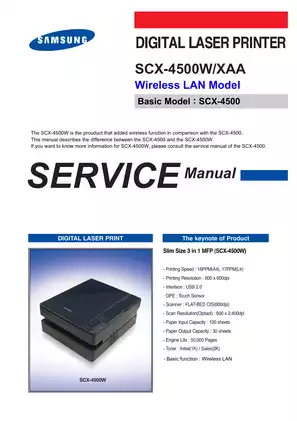
Samsung Models Covered & Key Technical Specifications
Models: Samsung SCX-4500, Samsung SCX-4500C, Samsung SCX-4500W
Sub-models / Variants: XAA, XEV, Wireless LAN model
Model Years: 2008
Technical Data:
- Print speed: 16 ppm (A4) / 17 ppm (Letter)
- Memory: 8 MB
- Scanner resolution: 600 x 2400 dpi (optical), 4800 x 4800 dpi (enhanced)
- Toner cartridge yield: 1000 pages (initial), 2000 pages (sales)
- Power consumption: Less than 350W (operation), less than 8.12W (sleep)
- Interface: USB 2.0
- Operating temperature: 10°C to 32°C
Samsung Manual Features & Content Preview
- Official Samsung OEM publication (PN JC92-02010A, version 1.00, February 2008) for the SCX-4500, SCX-4500C, and SCX-4500W laser multifunction printers.
- Contains a total of 162 pages of complete technical documentation, featuring a dedicated 64-page section specifically for diagnostic flowcharts and detailed mechanical assembly breakdowns.
- Serves as the primary factory reference detailing the Logan engine architecture and wireless LAN configurations.
Component and System Documentation
This service manual breaks down the internal structure and operating principles of the SCX-4500 3-in-1 laser multifunction unit. It provides a comprehensive look at the main controller architecture, featuring detailed overviews of the Chorus II RISC processor, flash memory, and SDRAM configurations. The document clearly outlines the engine hardware. You will find specifications for the laser scanner unit (LSU) with its reflection mirror and F-theta lens, the toner cartridge developing assembly, and the color CIS scanning module. Working with laser printer electronics, particularly high-voltage components, carries inherent electrical risks. Always disconnect the unit from the power supply and observe standard workshop safety protocols before inspecting internal assemblies. To assist with board-level diagnostics, the guide maps out the SMPS board power outputs alongside the HVPS board high-voltage distribution for charging, transfer, and developing processes.
Maintenance and Diagnostic Data
Engineers and technicians need precise data to troubleshoot effectively. The manual delivers essential performance benchmarks, including the 16 ppm (A4) print speed, the 50,000-page engine lifecycle, and exact environmental operating thresholds. The technical data section lists specific values for the fuser unit heating lamp and thermistor, noting that operating temperatures reach up to 170°C.
Troubleshooting print defects is streamlined using the provided image quality analysis tables. These tables correlate vertical lines, horizontal bands, and spot phenomena directly to component cycles. For example, you can match a recurring page mark to the 62.8 mm OPC drum interval or the 47.1 mm transfer roller period. To speed up the repair process, the document defines the logic for operation panel LEDs and specific error codes like T1, T2, and T3, helping identify exact component failures without guesswork.
Customer Reviews
Read what our customers say about this Samsung Printer manual and share your own experience.