Komatsu excavator listings can look almost identical until you compare the coverage markers printed on the manual itself. This post is a shopper-facing matching aid for the PDF on this product page—so you can confirm the correct PC200-6 family variant and serial window before you choose a download. If you’re browsing other machine families too, the Excavator manuals hub makes it easier to compare listings by category.
Match the exact machine line first (PC200-6 vs LC variants)
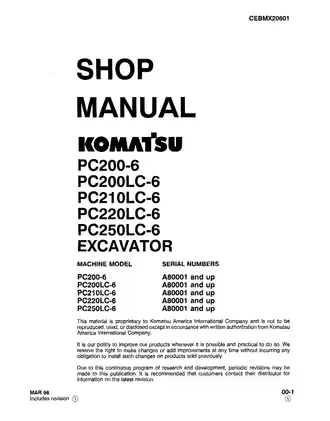
This manual groups multiple machine models under one shop-manual cover. The supported model lines shown together are:
- PC200-6
- PC200LC-6
- PC210LC-6
- PC220LC-6
- PC250LC-6
When a listing names your exact machine line (especially the LC designation), that’s a strong first confirmation that you’re looking at the right family.
Serial coverage cue: the “and up” breakpoint that matters
Beyond model name, Komatsu manuals often rely on a clear serial breakpoint. In this document, the serial window is stated as:
- A80001 and up (shown for each listed model line)
If your machine plate shows a serial that aligns with the “A80001 and up” window, the listing is much more likely to match this edition than a similar-looking page with a different breakpoint.
What this shop manual set is (and how it’s commonly packaged)
A Komatsu “shop manual” listing usually refers to a deep technical reference organized by major subject blocks (system overviews, reference tables, specifications pages, and similar). For many Komatsu machines, the shop-manual concept can be split by volume, commonly including:
- a chassis volume for the machine platform
- a separate engine shop manual as a companion reference
If a listing mentions multiple volumes or a companion engine manual, that’s often a completeness signal for buyers who want the full set of references for the machine family.
Quick “buying confidence” signals on the page
When comparing similar RepairLoader listings, these cues typically make a page easier to trust at checkout:
- a visible document/form number on the cover (this PDF shows CEBMX20601)
- the edition marker (this cover shows MAR 96)
- a clear model list and serial window printed together
If two pages look close, the one that displays more of these identifiers in the preview usually reduces guesswork.
Compare nearby listings in separate tabs
If you want to compare alternatives side-by-side, here are related RepairLoader links embedded in the text:
Use each page’s model line, serial breakpoint, and document number cues to pick the closest match.
What you may see inside (coverage preview)
- Cover page with model list and serial window statement
- Document/form number and edition marker pages
- Section contents pages for the full manual layout
- Reference tables for units, conversions, and fastener standards
- Electrical wire color/code reference tables
- Symbols legend pages used throughout the manual
- Publication listing pages for related manuals in the same machine family
| Listing cue | Identifier shown in this PDF | Matching tip |
|---|---|---|
| Machine class | Excavator | Confirms equipment type |
| Series tag | PC200-6 family (PC200-6 / LC variants) | Match your exact suffix line |
| Serial window | A80001 and up | Confirm your plate serial fits |
| Document ID | CEBMX20601 | Strong “same edition” signal |
| Edition marker | MAR 96 | Helps separate revisions |
| Volume note | Chassis shop manual + companion engine manual referenced | Useful if you want a complete set |
Before you choose a listing, line up the model line, the A80001-and-up serial window, and the document ID shown on the page preview. If you’re browsing broadly, the Excavator manuals hub is a clean way to compare similar Komatsu listings without relying on titles alone.