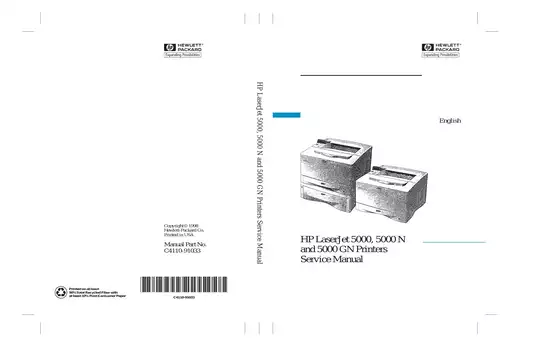
1997 HP LaserJet 5000 / 5000 N / 5000 GN Service Manual (393 P.)

Service documentation for 1997-1998 LaserJet 5000 series with troubleshooting procedures, paper path diagnostics, fuser assembly removal, and DC controller specifications.

4.5starstarstarstarstar_half(4)
visibility Preview Available
Hewlett Packard 1997 HP LaserJet 5000 / 5000 N / 5000 GN Service Manual (393 P.) manual page preview - page 1 of 387
Sample pages from the 1997 HP LaserJet 5000 / 5000 N / 5000 GN Service Manual (393 P.) manual
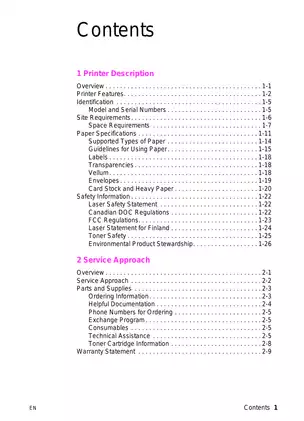
Hewlett Packard 1997 HP LaserJet 5000 / 5000 N / 5000 GN Service Manual (393 P.) manual preview page 1 - thumbnail
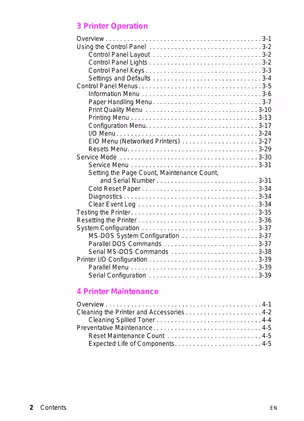
Hewlett Packard 1997 HP LaserJet 5000 / 5000 N / 5000 GN Service Manual (393 P.) manual preview page 2 - thumbnail
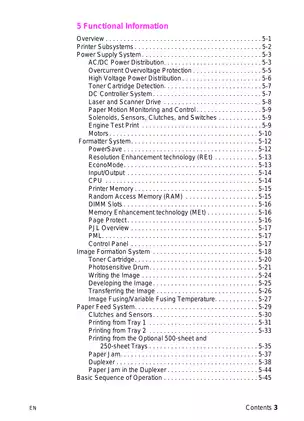
Hewlett Packard 1997 HP LaserJet 5000 / 5000 N / 5000 GN Service Manual (393 P.) manual preview page 3 - thumbnail
Hewlett Packard 1997 HP LaserJet 5000 / 5000 N / 5000 GN Service Manual (393 P.) manual preview page 4 - thumbnail
Hewlett Packard 1997 HP LaserJet 5000 / 5000 N / 5000 GN Service Manual (393 P.) manual preview page 5 - thumbnail
info_outline Click thumbnails to preview different pages

Purchase & Download

$4.99 (incl. VAT) - Instant Download Instant Digital Download – No Shipping Fees
2 sold in the last 30 days
OR BUY NOW

Document Details

keyboard_arrow_down
Document Number / Seller:
23272 / Joseph Moore
File Size:
7.10 MB
File Type:
PDF
Language:
English
Pages:
387
Printable:
Yes
Estimated Download Time:
0.15 Minutes
Delivery Format:
Digital (PDF) - Instant Access
Category:
Printer
Brand:
Hewlett Packard
Reviewed and Approved:
Apr 5, 2025
verified_user
Lifetime Access
Re-download anytime
flash_on
Instant Download
Get it immediately
lock
Secure Payment
PayPal

Models Covered & Key Technical Specifications

HP LaserJet 5000, 5000 N, 5000 GN (C4110-91033) — 1997–1998 Technical Service Sourcebook Specialized | LaserJet 5000 Series File.

  • Nominal Print Quality: 1200 dpi is standardized to the maximum addressable resolution Requirements.
  • Principal Securement Values: 100–127 VAC±10% at 50/60 Hz ±3Hz defines the electrical power input with 11 amps peak current Threshold.
  • Rated Liquid Volume: Hydraulic fuser assembly achieves 392°F (200°C) nominal operating temperature for toner adhesion Mapping.
  • Technical Power Rating: 100 MHz RISC microprocessor determines the formatter processing speed Configuration.
  • Standard Working Temperature: Operating range sets 50–91°F (10–32°C) for optimal electrophotographic process Benchmarks.
  • Defined Output Quality: 17 pages per minute (ppm) A4 or 16 ppm letter reaches the maximum print speed Range.

Professional Workshop Service Manual & Technical Specifications

Structured Installation Manual: HP LaserJet 5000/5000 N/5000 GN Service Manual-Nexus

Technical-Benchmarks: HP LaserJet 5000, 5000 N, 5000 GN (C4110-91033) // Calibration-Scope: Electrophotographic Printer / Engine Controller Logic // Maintenance-Category: 393-page technical reference documentation.

Specification Rating Calibration-Standards
Print Resolution 300-1200 dpi Multiple resolution modes documented
Paper Capacity 100-500 sheets Tray-specific capacity specifications provided
Operating Temperature 50-91°F (10-32°C) Environmental tolerance parameters included
Power Requirements 100-127 VAC / 220-240 VAC Dual-voltage electrical specifications detailed
Memory Configuration 4-12 MB standard DIMM expansion procedures documented
Monthly Duty Cycle 150,000 pages Maintenance interval specifications referenced

Technical units are distributed across Printer Operation, which details Functional Information, addressing Removing and Replacing Parts, presenting Troubleshooting procedures, and documenting Parts and Diagrams reference materials.

Systematically calling for comprehensive coverage, the manual documents the complete service architecture for HP's 17 ppm (A4) electrophotographic laser printer platform. The Printer Description chapter establishes foundational specifications including three model variants with progressive memory configurations, bidirectional IEEE 1284 parallel interface architecture, and dual-voltage power supply compatibility across 100-127 VAC and 220-240 VAC ranges. Documentation confirms operating temperature boundaries spanning 50–91°F with relative humidity tolerance between 20-80% non-condensing conditions.

The Service Approach section identifies field-replaceable unit methodology with emphasis on assembly-level component replacement. The manual references maintenance kit contents including fuser assembly, transfer roller, pickup mechanisms, and separation pad components calibrated for 150,000-page service intervals. Technical notes are provided for Support Materials Organization ordering procedures, with distinct part numbering systems for 110V and 220V regional variants and exchange program specifications for remanufactured assemblies.

Printer Operation documentation encompasses control panel menu structures across eight primary categories: Information, Paper Handling, Print Quality, Printing, Configuration, I/O, EIO networking, and Resets functions. The service mode procedures include page count verification, maintenance counter reset protocols, serial number configuration, and diagnostic activation sequences. Quality checks are addressed for Resolution Enhancement technology with four density settings, EconoMode toner conservation parameters, and variable fuser temperature modes spanning Normal, Low, High, and Vellum media specifications.

Functional Information systematically details six subsystem architectures. The Power Supply System section documents low-voltage DC generation at +3.4V, +5V, and +24V rails with overcurrent protection and thermal monitoring via thermistor TH1301 calibrated to 392°F fusing roller temperature. The DC Controller System manages laser diode modulation, paper motion coordination through photosensor PS401, PS301, PS402, PS403, and PS1307 flag detection, and main motor drive at 100 MHz RISC processor clock speeds. Image Formation documentation describes the six-stage electrophotographic process: cleaning via blade assembly, conditioning through primary charging roller with AC/DC bias superposition, laser writing at 1200x1200 dpi addressability, developing cylinder toner attraction, transfer roller positive charge application, and pressure fusing at controlled temperatures.

The Removing and Replacing Parts chapter provides exploded-view diagrams with numerical callouts for 47 major assemblies. Timing procedures are documented for DC Controller Board extraction requiring five rear-chassis screws and two internal long-screw fasteners, fuser removal via dual pressure-release handles with connector disconnect sequences, and formatter board withdrawal using captive thumbscrew mechanisms. The manual includes torque specifications for main gear assembly grounding screws, paper handling PCA mounting hardware, and laser scanner retention fasteners. Tool requirements specify Phillips #2 magnetized screwdriver with 6-inch shaft length and differentiation between self-tapping versus machine screw applications.

Troubleshooting methodology follows systematic fault isolation beginning with power-on verification through fan motor rotation observation, progressing to control panel display functionality, Event Log analysis of 30-entry error history, and paper path sensor validation. The document includes comprehensive defect identification matrices for image quality issues: repetitive defect ruler calibrated to photosensitive drum circumference of 94mm, fusing roller dimension of 86mm, and transfer roller spacing calculations. Engine test procedures bypass formatter circuitry to isolate print engine functionality through dedicated test button activation. Half self-test functional checks determine electrophotographic stage performance by interrupting paper motion mid-cycle for toner image inspection on drum surface.

The Parts and Diagrams section organizes components through three indexing methods: alphabetical nomenclature, numerical part number sequence, and exploded-view illustration cross-reference. Documentation specifies Support Materials Organization contact protocols, with North American ordering through 1-800-227-8164 and European SME coordination via +49-7031-142253. Exchange program availability covers DC Controller assembly C4110-69001, fuser units C4110-69002 (110V) and C4110-69003 (220V), laser scanner C4110-69008, and maintenance kit C4110-69006/69007 voltage-specific variants. The manual documents torque specifications for belt assembly through fastener identification tables listing M3x6, M4x10, and M4x16 screw classifications with corresponding part numbers and application-specific washer configurations.

FAQ

Specify the **applicable** maintenance interval for component replacement? keyboard_arrow_down

150,000 pages triggers the PERFORM PRINTER MAINTENANCE message requiring installation of the maintenance kit containing fuser, transfer roller, pickup components, and separation pads per the preventative maintenance schedule.

What is the **exact** fuser operating temperature specification? keyboard_arrow_down

392°F (200°C) nominal operating setpoint maintains proper toner adhesion with thermal protection at 240°C via thermal fuse cutoff and 230°C overvoltage protection relay activation.

Calculate the **specific** voltage requirements for power supply operation? keyboard_arrow_down

100-127 VAC ±10% at 50/60 Hz ±3Hz with 11 amps peak or 220-240 VAC ±10% at 50/60 Hz ±3Hz with 5 amps generates +24 VDC, +5 VDC, and +3.4 VDC output.

What values define **designated** paper handling capacity specifications? keyboard_arrow_down

100 sheets in Tray 1 (3x5 to 12.28x18.5 inches), 250 sheets in Tray 2, optional 500-sheet universal tray, and 250-sheet top output bin with 50-sheet rear output bin comprise standard configuration.

Assess the **critical** toner cartridge weight specifications? keyboard_arrow_down

1880 grams (66.3 oz) full weight versus 1450 grams (51.1 oz) empty weight indicates remaining toner supply for 10,000 page yield at 5% coverage before replacement.

Customer Reviews

Read what our customers say about this Hewlett Packard Printer manual and share your own experience.

Add a Review

* Required information
1000
Captcha Image

Reviews (4)

Avatar
New
While the manual is helpful, I wish it had more advanced troubleshooting tips. However, the download process was quick and the support team was very professional!
Avatar
New
This guide is thorough and easy to understand. I appreciated the quick email response from support when I needed assistance with a tricky repair. Highly recommend!
Avatar
New
This manual is a must-have for anyone servicing HP LaserJet printers. The troubleshooting section is incredibly detailed and has saved me a lot of time!
Avatar
New
The diagrams and layouts included are perfect for visual learners. I had a smooth download process, and the support team was very responsive when I had questions.